Showing posts with label SYSTEM TOOLS. Show all posts

16.3.11

Soluto 1.1.1433 Beta


Soluto 1.1.1433 Beta

 1.14MB (Freeware) - beta
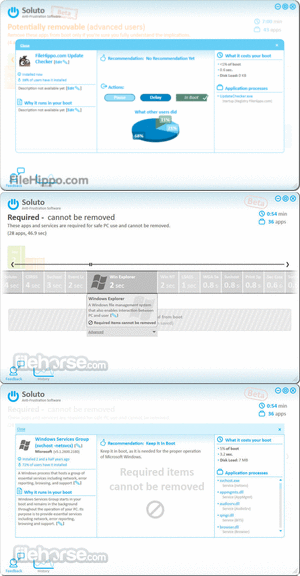
Soluto's goal is to bring an end to the frustrations PC users encounter. Soluto developed technology that tackles this problem from two different directions:
Frustration detection: Our patent-pending low level driver technology detects when you're frustrated by your PC and tells you which application is causing it.
Power of the crowd: Soluto harnesses the power of the crowd to learn which actions really eliminate frustrations and improve user experience, and leverages this user wisdom for the benefit of all PC users. By using Soluto's software, you're putting a whole community of PC power-users at your desk to help you improve your PC experience.


20.2.11

GPU-Z 0.5.1

GPU-Z 0.5.1

887KB (Freeware)
GPU-Z is a lightweight utility designed to give you all information about your video card and GPU.
  • Support NVIDIA and ATI cards
  • Displays adapter, GPU and display information
  • Displays overclock, default clocks and 3D clocks (if available)
  • Validation of results
  • No installation required
  • Support for Windows 2000 / XP / Vista (both 32 and 64 bit versions are supported)


Folder Size 2.5 (64-bit)


Folder Size 2.5 (64-bit)

244KB (Freeware)
Folder Size for Windows adds a new column to the Details view in Windows Explorer. The new column shows not only the size of files, but also the size of folders. It keeps track of which folders you view, and scans them in the background so you can see complete size of all files within the folder.


Folder Size 2.5 (32-bit)


Folder Size 2.5 (32-bit)

223KB (Freeware)
Folder Size for Windows adds a new column to the Details view in Windows Explorer. The new column shows not only the size of files, but also the size of folders. It keeps track of which folders you view, and scans them in the background so you can see complete size of all files within the folder.


3DMark03 3.6.0


3DMark03 3.6.0

178.04MB (Freeware)
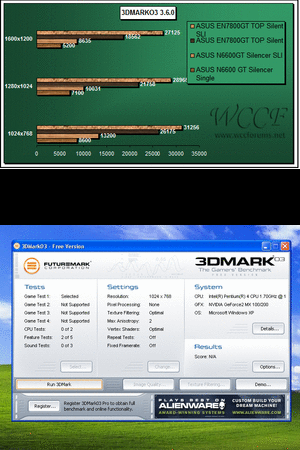
3DMark03 is a computer benchmarking tool to determine the performance of your computer's 3D graphic rendering and CPU workload processing capabilities for gaming and other applications.
3DMark03 is the first version that supports Microsoft DirectX 9.0 and introduces several new features. The graphics tests cover a range of rendering techniques and DirectX 9 features.


27.12.10

Duplicate Commander 1.8

Duplicate Commander 1.8  
(589.8KB) freeware
Duplicate Commander is a small, easy to use but powerful application designed to enable you to find and manage duplicate files on your computer. It´s designed to be fast, stable, and easy to use.


Process Explorer 14.01

Process Explorer 14.01

1.76MB (Freeware)
The Process Explorer display consists of two sub-windows. The top window always shows a list of the currently active processes, including the names of their owning accounts, whereas the information displayed in the bottom window depends on the mode that Process Explorer is in: if it is in handle mode you'll see the handles that the process selected in the top window has opened; if Process Explorer is in DLL mode you'll see the DLLs and memory-mapped files that the process has loaded. Process Explorer also has a powerful search capability that will quickly show you which processes have particular handles opened or DLLs loaded.


23.12.10

CPU-Z 1.56

CPU-Z 1.56

3.51MB (Freeware)
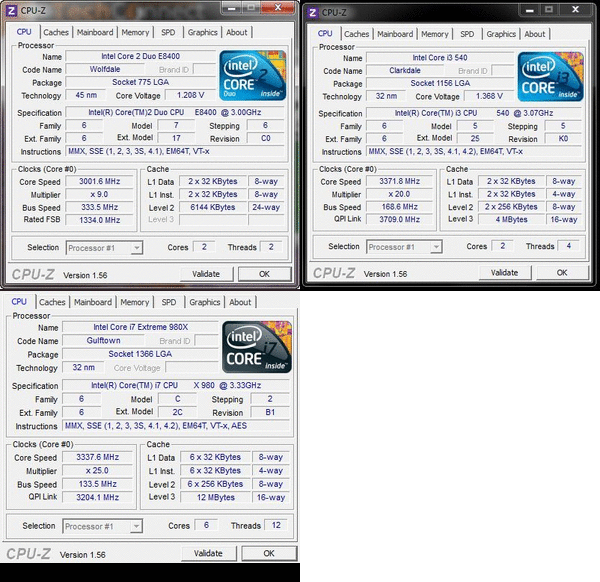
CPU-Z is a freeware utility that gathers information on some of the main devices of your system. CPU-Z does not need to be installed, just unzip the files in a directory and run the .exe. In order to remove the program, just delete the files. The program does not copy any file in any Windows directory, nor write to the registry.


22.12.10

Process Tamer 2.11.01

Process Tamer 2.11.01
140k (freeware)

Process Tamer is a tiny (140k) and super efficient utility for Microsoft Windows XP/2K/NT/Vista/Win7 that runs in your system tray and constantly monitors the cpu usage of other processes. When it sees a process that is overloading your cpu, it reduces the priority of that process temporarily, until its cpu usage returns to a reasonable level.


27.11.10

Folder Size 2.5

Setting it up

  1. First, make sure you're running Windows 2000 or XP. Sorry, it doesn't work in Vista or 7.
  2. Download the installer (regular 32-bit) (XP x64).
  3. Run the downloaded file to start the install wizard. It has boring template text, so just keep clicking Next.
  4. Now the Folder Size column is available to Explorer, but Explorer isn't displaying it yet. Open an Explorer window in Details view.
  5. Right click on the column headers to see a list of columns you can add. Choose Folder Size.
  6. Now we can replace the existing Size column with the new Folder Size column. Right click on the column headers and uncheck the Size column. Drag the Folder Size column header to where Size used to be.
  7. Make this the default view for all folders. Go to Folder Options from the Tools menu. In the View tab, click Apply to All Folders.

Changing settings

Look in the Windows Control Panels to find the Folder Size control panel. If you're in the confusing Category View in XP, where it says Pick a category, click on Switch to Classic View in the left-hand pane. And then view as Icons. Isn't that better?

Use the control panel to change the way sizes are displayed. Also stop the service to stop any background activity.

Removing

It never crashes or slows down my computer, but yours is different from mine, and maybe it doesn't work so well for you. If you want to uninstall it, use the Add or Remove Programs control panel. You'll have to manually fix the columns in Explorer too.

Download Folder Size 2.5 32-bit


Download Folder Size 2.5 64-bit


Speccy v1.07


Speccy v1.07

Speccy Speccy v1.07 is now available for download. In this release we have focused on giving you more information about your hard drives and operating system. Along with improving the detection speeds!

Changes include:
  • Improved hardware detection speeds.
  • Fixed SATA interface detection issues.
  • Improved detection of removable drives.
  • Information from the Windows Security Center.
  • Windows Defender status.
  • Windows 7 compatibility fixes.
  • General usability improvements.
  • Various stability fixes.
  • Online Help link.


21.11.10

Perfect Optimizer v5.2.6.63


Home Feature
Perfect Optimizer is an advanced registry analyzer and optimizer that can boost your computer's performance and improve the overall speed of your system. It offers an extremely powerful and stable scanning technology, and complete protection against data loss during the optimization process. It also features a powerful defragmentation engine that allows you to improve the access to the system registry by optimizing disk accesses to the files that comprise your Windows registry.
Registry Cleaner
The first step when you choose the Registry Cleaner is to select which categories you would like to scan for errors: By default, all categories are selected. We're proud to say that our engine is a world leading custom advanced tool that is unbeatable. Simply click 'START SCAN'... to begin advanced scanning of your system. This will start the actual scanning process. As the scan goes on, you will see a progress report window that shows you at all times the number of errors found and the scan progress. You can choose to pause the scan at any time by pressing ABORT or Cancel the scan. After the scan has finished, your data will be backed up automatically to preventing you from losing any data. Once the backup process has finished, you should see the scan results: Now simply click the 'REPAIR ALL' button to repair all the errors and create a backup of all changes made automatically.

Defragment


You can choose to defragment the system registry using this feature, and analyze current registry fragmentation: Click the ANALYSIS button to verify if the system registry is fragmented or not. If your registry is not fragmented, you should see a screen similar to this one: If your registry is fragmented, you can now choose to defragment your registry by pressing the Defragment button, or Cancel the defragmentation.


PC Optimizer


This feature allows you to tweak your system for maximum performance, based on your computer's profile. You need to select what best describes your computer from the list present in this dialog box, then click the Next button to proceed further and examine how your computer will be tweaked, or click the Fast Optimization button to apply the changes immediatly.


Evidence Cleaner


This feature allows you to clean the cookies, browser history, temporary Internet files, hidden INDEX.DAT files, browser typed URLs, visited URLs, AutoComplete forms data and passwords for five major browsers: Mozilla FireFox, Internet Explorer, AOL Explorer, Opera and Netscape Navigator.


File Shredder


This feature allows you to delete files beyond recovery for maximum privacy: (WARNING: This will literally remove files FOREVER, you WILL NOT be able to recover the data EVER again - use with caution).


TuneUp Utilities™ 2011!

Status & recommendations

Status & recommendations

The intuitive Start Center with a fresh look and feel gives you complete control and access to the most important tuning steps at a glance.
Optimize system

Optimize system

Get rid of those PC brakes and drop the dead weight in programs: for maximum speed whether working, surfing, or playing!

Gain disk space

Gain disk space

Find and remove large resource hogs and annoying data trash to make your PC run even more efficiently.
Fix problems

Fix problems

Fix the most common Windows® problems, scan your hard disk and restore deleted files.
Customize Windows®

Customize Windows®

Change the visual appearance of Windows® to match your style and safely modify over 400 Windows® settings.
Overview of all functions

Overview of all functions

Professional users have direct access to 32 optimization tools TuneUp Utilities™ 2011 offers.